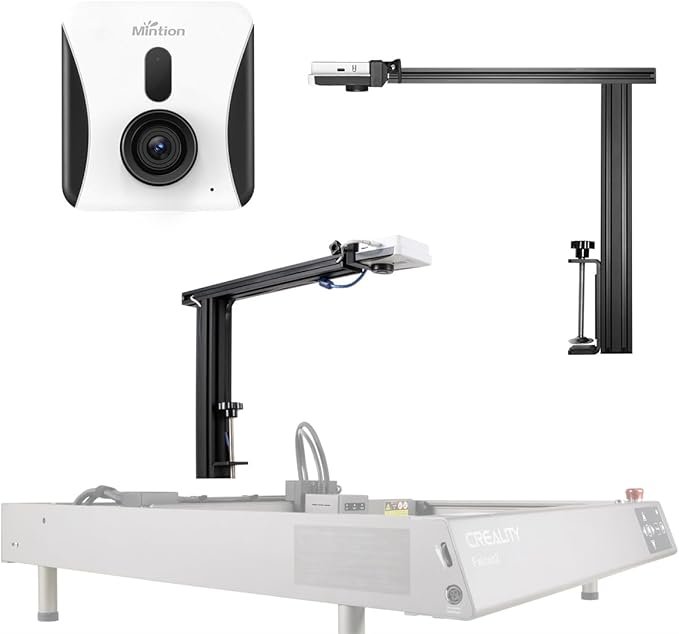
Lightburn Camera and Mintion Upgraded Lasercam: Revolutionizing Laser Engraving

The world of laser engraving is advancing rapidly, with tools and accessories making the process more precise, efficient, and user-friendly. Among these innovations, the Lightburn Camera and the Mintion Upgraded Lasercam stand out as crucial components that can enhance your laser engraver’s capabilities. These devices bring a range of features including precise positioning, image tracing, wireless bridge compatibility with Lightburn software, and even remote monitoring and time-lapse video capture. Whether you’re an enthusiast or a professional, integrating these cameras into your workflow can significantly improve both accuracy and efficiency.What is a Laser Engraver Camera?Laser engraver cameras like the Lightburn Camera and Mintion Upgraded Lasercam are specifically designed to work with laser engraving machines. These cameras provide a real-time view of your workspace, allowing you to visually align your designs with the materials you’re working on. This eliminates the guesswork in positioning and minimizes errors, saving both time and material.Key Features of the Mintion Upgraded LasercamThe Mintion Upgraded Lasercam is one of the most advanced laser engraver cameras available. Here’s a breakdown of some of its standout features:1. Precise PositioningOne of the main challenges with laser engraving is ensuring that the laser is perfectly aligned with the material. The Mintion Lasercam allows for precise positioning by giving you a clear view of the engraving bed and the ability to easily adjust the placement of your design. This is especially beneficial for intricate designs that require exact alignment to avoid wasting materials.2. Image TracingAnother impressive feature is image tracing. With the Mintion Lasercam, users can trace an image directly from the material onto the software interface. This feature makes custom engraving projects faster and more accurate by removing the need for manual measurements and complex alignment processes. Simply place the material, let the camera capture its image, and trace the design you want to engrave.3. Wireless Bridge for Lightburn SoftwareThe wireless bridge capability allows the camera to integrate seamlessly with Lightburn software, one of the leading laser engraving programs. This wireless connection reduces the hassle of managing cables and allows for easier setup. With the camera wirelessly linked to your computer, you can control and monitor your engraving from a distance. This feature is particularly useful in larger workshop setups where direct connectivity to the laser engraver may not be convenient.4. Remote MonitorRemote monitoring is a game-changer for laser engraving enthusiasts and professionals alike. With the Mintion Lasercam, you can monitor the progress of your engraving projects from a separate location. This means you can keep an eye on long engraving sessions without having to be physically present in the workshop, allowing you to work on other tasks simultaneously.5. Time-Lapse VideoThe ability to capture time-lapse videos of your engraving projects is another feature that appeals to both hobbyists and businesses. Time-lapse videos not only provide a visual record of your work but also serve as excellent marketing material for social media platforms or client presentations. This feature is also helpful for analyzing the engraving process to identify potential improvements.How the Lightburn Camera Complements the Mintion LasercamWhile the Mintion Lasercam offers incredible features, the Lightburn Camera is another essential tool that enhances your laser engraving setup. Specifically designed to work with Lightburn software, the camera offers high-resolution imagery that allows for even more precise control over your engraving projects.With the Lightburn Camera, you can capture an overhead view of your engraving bed and import it directly into the software. This makes it easier to visually place designs on irregularly shaped materials or pre-cut pieces. By combining the strengths of both the Mintion Lasercam and the Lightburn Camera, you can achieve unmatched precision and control in your laser engraving projects.Why Invest in Laser Engraver Cameras?If you’re still unsure whether investing in a laser engraver camera is worth it, consider the following benefits:Efficiency: With real-time visual feedback, you can quickly adjust your designs to ensure perfect alignment. This reduces setup time and minimizes material waste.Accuracy: Features like precise positioning and image tracing give you more control over the final outcome of your projects, resulting in more professional-looking products.Convenience: The wireless bridge and remote monitoring capabilities allow you to manage your engraver from a distance, making the entire process more flexible and user-friendly.Creativity: Time-lapse videos and image tracing open up new possibilities for creative projects, from personalized gifts to detailed commercial engravings.ConclusionIncorporating tools like the Lightburn Camera and the Mintion Upgraded Lasercam into your laser engraving setup is a smart move for anyone looking to elevate their craft. With features like precise positioning, image tracing, wireless connectivity, and remote monitoring, these cameras provide both hobbyists and professionals with the tools needed to create detailed, high-quality engravings efficiently and accurately. Whether you’re looking to improve your workflow, increase your output, or simply enjoy more creative freedom, these laser engraver cameras are well worth the investment.