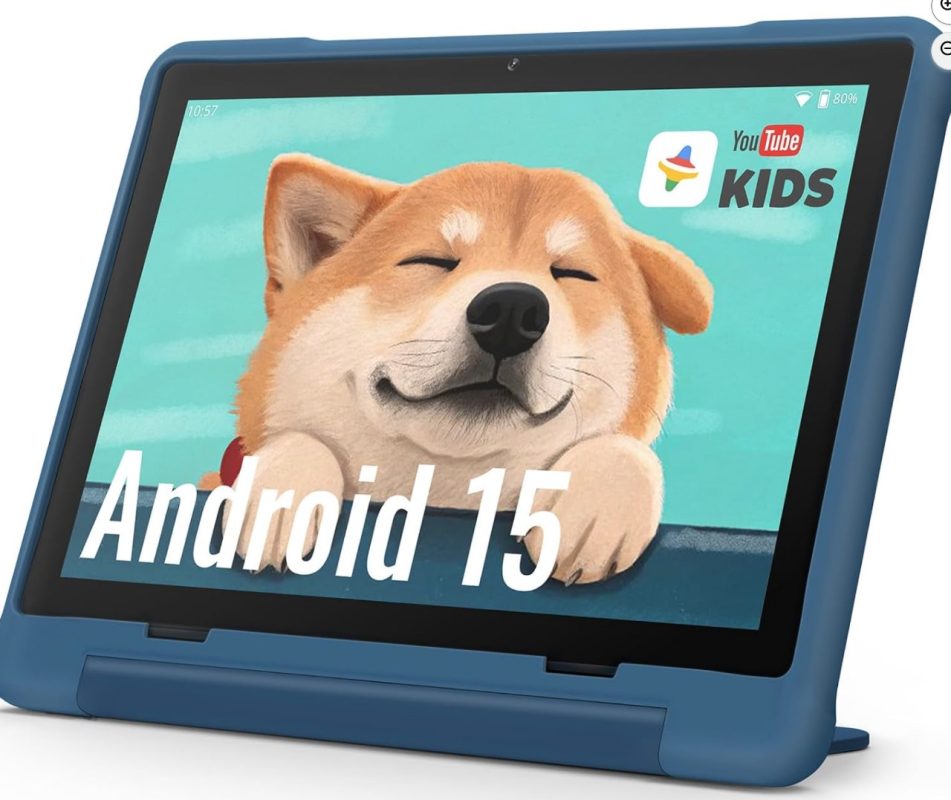
This 10″ Android 15 Kids Tablet Is a Smart Pick for Ages 3+

✅ What’s Great About It
- 10″ Touch Screen
A 10‑inch display gives plenty of room for games, reading apps, drawing, videos — especially useful as your child grows. Experts say 8‑10″ is the sweet‑spot for both early learning and later entertainment.
The larger size also means easier to share (siblings, parents) or set up for “learning time.”
Of course, if your child is very small (age 3–4) it might feel a bit big compared to a 7‑ or 8‑inch model — but with the protective case included, it’s more manageable. - 8 GB + 64 GB Storage, Expandable to 512 GB
Having 64 GB of internal storage is generous for a kids’ tablet (apps, videos, offline content). Expandability up to 512 GB means it can grow with them — fewer worries about running out of space.
Storage is one of the key things recommended for kids’ tablets: enough room for apps + media. - WiFi 6 and Bluetooth 5
These are newer connectivity standards — WiFi 6 means faster, more reliable network (especially helpful if streaming video, doing remote learning). Bluetooth 5 means better connectivity to accessories (headphones, Bluetooth speakers) with improved range and speed. - Pre‑Installed Parental Controls + Kids Space + Family Link
One of the most important features for a kids’ tablet is strong parental control: screen time limits, app restrictions, safe content. Many reviews emphasise this.
The inclusion of both “Kids Space” (which likely means a child‑friendly interface) and “Family Link” (Google’s control features) means this tablet is set up for kids, not just a generic tablet with a case slapped on. - Rugged/Protected With Case
The case is essential when kids use tablets: drops, spills, rough handling are normal. According to buying guides: durability + protective case = must‑have.
So the fact that this tablet comes “with case” is a bonus. - Android 15
Having a recent operating system (Android 15) means longer software support, better security, newer features. Plenty of kids’ tablets are older OS versions and may not benefit from updates over time. So this keeps it more future‑proof.
🎯 What To Keep In Mind / Potential Limitations
Even though 8 GB + 64 GB is good, if you load tons of high‑res videos/apps (especially as the child grows) you may want to use the expandable slot soon.
A 10″ size is great, but it’s a bit heavier and larger for very young children (age 3–4) who may prefer smaller/touch‑friendly sizes.
The brand/manufacturer of this particular tablet may matter (warranty, update policy, after‑sales) — always check reviews.
Parental controls are built‑in, but as parents you’ll still need to configure them (set limits, approve apps, monitor usage) for them to work well.
Screen‑time balance still matters! A tablet is a tool, not just a toy. The case, controls and connectivity help — but guidance matters too.
🧒 How To Use It Best For Your Child (Age 3+)
Initial setup: Create a child profile via Family Link / Kids Space. Set screen time limits (daily/hourly), bedtime cut‑off.
Content planning: Pre‑install age‑appropriate learning apps, books, videos. For age 3–5, focus on basic literacy, numbers, colours, simple games.
Case + stand: Use the protective case. You might also consider a stand so it’s stable (especially when they watch videos).
Expand storage as needed: If you see the internal 64 GB filling up (apps + video + offline content), add a microSD to expand to 512 GB.
Use WiFi “smartly”: With WiFi 6 you can stream or download high‑quality content, but also ensure the network has safe settings (e.g., guest mode, secure password).
Encourage other activities: Tablet time should be balanced with physical activities, reading physical books, outdoor play. Especially for younger kids.
Monitor and adapt: As they get older (5–7+), you might gradually introduce more “serious” apps (e.g., drawing, coding, family‑friendly content). The full Android experience means it can scale from “toy” to “learning tool”.
📝 Summary
All in all, this tablet ticks almost everything a parent should look for in a kids’ device in 2025:
Big, engaging screen (10″)
Good performance + storage (8 GB+64 GB, expandable)
Modern connectivity (WiFi 6, BT5)
Dedicated protective case and kids‑friendly features
Strong parental controls baked‑in
Uptodate OS (Android 15)
If I had to give a verdict: Yes, this is a very good choice for a child age 3+ and should serve well for several years (with proper supervision and usage).
If you like, I can compare this tablet to 2‑3 other popular kids’ tablets in Pakistan (so you can see local pricing + value) — would that be helpful?