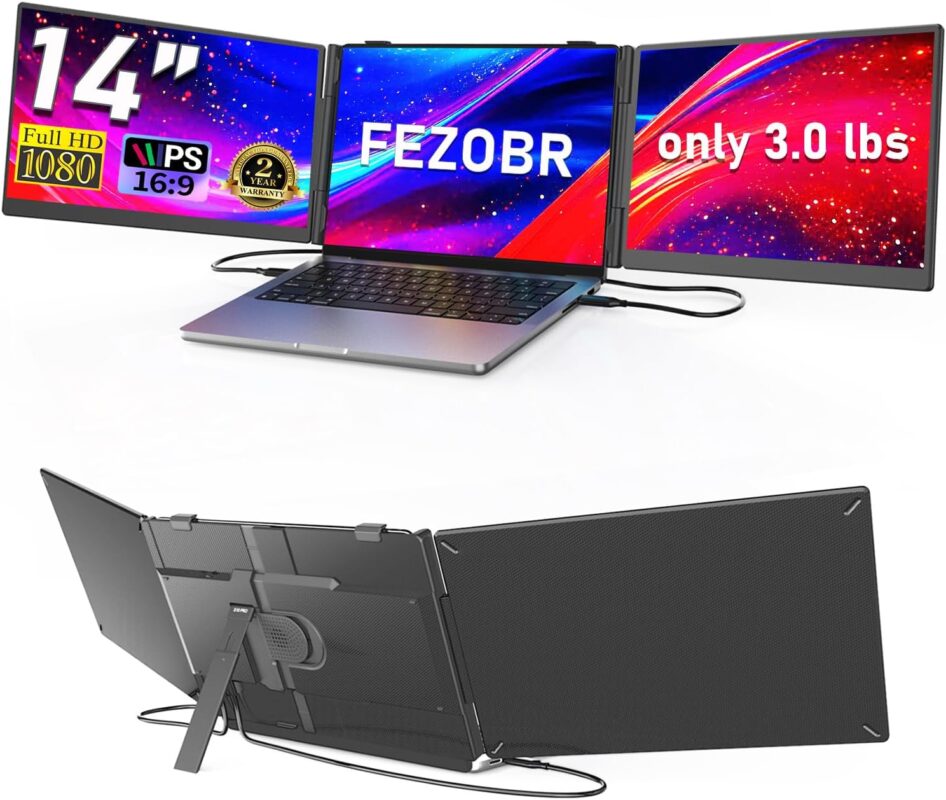
Transform Your Workflow: 14″ Triple Laptop Screen Extender Review

Working across multiple browser tabs, spreadsheets, trading charts, or communication apps on a single laptop screen often leads to endless Alt-Tabbing. A 14″ Triple Laptop Screen Extender (1080P Full HD) transforms your mobile setup into a full three-screen command center without requiring a permanent desk rig.
Quick Specifications
| Feature | Specification |
|---|---|
| Panel Size | Dual 14-inch IPS displays (creates a 3-screen layout with your laptop) |
| Resolution | 1920 × 1080 (FHD) @ 60Hz per panel |
| Form Factor | Foldable, ultra-slim bracket with built-in adjustable kickstand |
| Connectivity | Full-function USB-C (DisplayPort Alt Mode + Power), Mini-HDMI |
| Compatibility | Windows, macOS (check chip limits), ChromeOS, Linux |
Key Advantages
1. Instant Multi-Monitor Productivity Anywhere Instead of cramming windows into split-screen mode, you get three dedicated workspaces. You can run primary tasks in the center while keeping reference material, dashboards, or communication windows pinned on the sides.
2. Clean 1080P IPS Displays Both 14-inch panels use IPS technology, providing consistent contrast and 178° viewing angles. The matte finish cuts glare from overhead lighting, making long working sessions easier on the eyes.
3. Ultra-Slim Foldable Design The extender folds flat against its mounting bracket, sliding into standard laptop backpacks. An integrated kickstand on the rear takes the mechanical strain off your laptop hinge, ensuring stable placement on coffee shop tables or hotel desks.
4. Plug-and-Play Setup If your laptop features two full-function USB Type-C ports (supporting video output and power delivery), each screen connects with a single cable—no clunky power bricks required. For laptops without dual video-capable Type-C ports, included Mini-HDMI to HDMI cables combined with standard USB power cables bridge the gap.
Compatibility & Buying Considerations
- Laptop Port Requirements: Running two external displays requires your laptop to output two distinct video streams. Verify whether your machine has dual full-spec USB-C ports or an HDMI port alongside a display-capable USB-C port.
- MacBook Chip Limitations: Base Apple Silicon chips (standard M1, M2, M3) natively support only one external display without workarounds like DisplayLink adapters or drivers. MacBook Pro models with “Pro” or “Max” chips support multiple displays natively.
- Laptop Sizing & Weight: Designed primarily for 13.3″ to 16″ laptops. Ensure your laptop lid is sturdy, and always extend the built-in kickstand to avoid tipping backwards.
- Battery Consumption: Powering two active IPS panels directly from your laptop battery accelerates drain. When working for extended periods, plugging your laptop into its AC charger is recommended.
Ideal Use Cases
- Data & Research: Compare documents side-by-side without toggling windows.
- Remote Professionals: Keep video calls open on one side, shared presentations in the center, and notes on the other.
- Content Creators & Coders: View IDE/terminal on one screen, live preview in the middle, and documentation on the third.